
Development
My AI-Assisted Blogging Workflow: From Idea to GitHub Issue to Pull Request

One article convinced me that I needed a better AI blogging workflow.
It was my guide to getting a 100 PageSpeed Insights score on mobile and desktop. The finished post required much more than drafting paragraphs. I had to inspect reports, verify technical claims, decide which results mattered, create and optimize images, rebuild the site, review the rendered page, run repeated Lighthouse audits, and keep the full body of a future-dated article out of the public build while its noindex teaser remained available.
The quality was worth preserving. The fragmented decisions were not.
My answer is a human-led process that starts before anyone drafts a sentence. I discuss several ideas as a batch, approve a clear brief for each one, and record every brief in its own GitHub issue. AI can then assist with research, structure, writing, images, implementation, and verification. The work moves to a dedicated branch and a draft pull request, where I review the actual result. Only after approval can it be merged and later published on schedule.
What is my AI blogging workflow?
Quick answer: I separate editorial decisions from production work. I first approve the topic, audience, search intent, evidence, outline, links, image direction, and publication date. That agreement becomes a GitHub issue with acceptance criteria. An AI assistant works from the issue on a dedicated branch, builds a local preview, runs the required quality checks, and opens a draft pull request. I review and revise the rendered article before approving the merge. Scheduled publishing is a later, separate step.
This makes AI useful without giving it editorial authority. The issue defines the job. The repository holds the evidence. Tests and browser audits verify the implementation. I own the experience, claims, judgment, voice, and final decision.
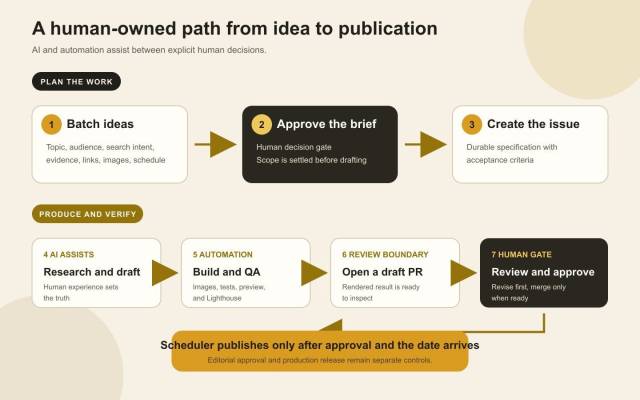
AI and automation make the middle of the process faster. They do not replace the decisions at either end.
The PageSpeed article exposed the real cost of fragmented decisions
At first, creating the PageSpeed article sounded straightforward. Explain what I changed, include the mobile and desktop results, and publish it.
In practice, every stage opened another decision:
- Should the post be a personal case study or a generic optimization guide?
- Which starting and final numbers were supported by the reports?
- Should the report images be literal screenshots or screenshot-inspired visuals?
- Which implementation details would be useful to another developer?
- How should mobile and desktop image delivery be explained?
- What would prove that future articles still met the same standard?
- How could I preview a scheduled post locally without exposing its full body in production before publication?
Those were legitimate questions, but they arrived one at a time while production was already moving. Batch planning moves those choices to the beginning so work can proceed from a settled brief. I am not claiming measured time savings because I have not collected that data. The immediate benefit is fewer avoidable interruptions and a durable record of the agreement.
I build on ProBlogger's separate-stage approach
Ali Luke's ProBlogger article, How to Write Faster, Better Blog Posts: 4 Techniques Top Bloggers Use, treats idea generation, outlining, drafting, editing, and publishing as distinct parts of blogging. That separation is useful because each stage has a different job and can be improved without pretending the entire process is one act of writing.
The article also presents AI as supervised assistance rather than a substitute for a skilled blogger. Its practical point is that AI may help with preliminary research or a rough outline, while the publisher still has the final say and remains responsible for accuracy.
My workflow extends those ideas into the way a developer already manages software. I add an approved specification, version-controlled implementation, automated checks, a review boundary, and a separate release step. The result is not software theater applied to prose. It is a way to make every editorial handoff explicit.
What gets decided during batch planning
Batch planning is where I want uncertainty to surface. I can compare several article ideas, resolve common choices together, and see whether the publication calendar tells a coherent story.
For every article, I settle:
- The working title and central argument
- The intended reader and the problem the post should solve
- The primary keyword, supporting terms, and search intent
- The questions a direct-answer engine or hurried reader should be able to resolve
- The approved outline and the evidence each section needs
- Personal experience, examples, external sources, and internal links
- The call to action, category, and tags
- The featured-image direction and any useful in-content visual
- The publication date, time, and timezone
- Article-specific acceptance criteria
The brief still leaves room for discovery and voice. It closes the decisions that would block production or change the article's purpose halfway through, and it lets me reject a weak angle before generating an unnecessary draft.
Why every approved article becomes a GitHub issue
A conversation is useful for reaching agreement. It is a weak long-term specification.
Chat history can become long, details can be summarized, and a future work session may start with different immediate context. A GitHub issue gives the article one durable home. It records the objective, audience, keywords, angle, outline, evidence, links, image requirements, schedule, and acceptance criteria.
The issue preserves intent and serves several purposes:
- It preserves intent. The production work does not depend on reconstructing an earlier conversation.
- It defines done. The checklist states what evidence, images, links, tests, and performance results are required.
- It limits drift. New ideas can be evaluated against the approved angle instead of silently expanding the assignment.
- It creates traceability. The branch and pull request can point back to the exact brief that authorized the work.
- It keeps the queue visible. Each article has a status and a scheduled place without mixing its files with another draft.
For this site, one issue represents one article. That boundary is easy to review and keeps unrelated drafts apart.
Where AI helps in the production process
Once the issue is ready, AI can compress a lot of careful but repetitive work.
Research and source verification
An assistant can locate current primary documentation, extract the relevant claims, compare sources, and flag facts that may have changed. It can also inspect the repository for existing articles, terminology, and internal-link opportunities.
Search results are not truth. The source still needs to support the claim. Ambiguous claims are narrowed or removed.
Outlining and drafting assistance
The approved issue already contains the article's spine. AI can develop transitions, identify unanswered questions, suggest a clearer order, and produce a first complete draft that is easier to critique than an empty page.
I use that draft as material, not authority. The words must remain consistent with what I actually did and believe. This is the same principle I apply in a practical AI workflow for WordPress developers: define the job, use AI to accelerate implementation, and review the output instead of worshipping the first pass.
Images and diagrams
AI image generation is useful for an original featured concept when the visual direction is already approved. Code-native diagrams are often better for exact sequences because their labels, relationships, and layout can be controlled directly.
The assistant can also export JPG files, generate responsive widths, optimize them, and strip metadata. A beautiful oversized image is still a defect.
Repository implementation
The article is not complete when text exists in a chat window. It needs valid front matter, a stable slug, correct image paths, an approved timestamp, and Markdown the PHP generator can render. A coding assistant can implement and inspect the work inside the real publishing system instead of handing me text to integrate later.
Quality assurance
An assistant is well suited to repeating deterministic checks. It can run the build, test suite, image inspection, preview build, visual browser review, and Lighthouse matrix, then report the actual numbers.
The important word is actual. “This should be fast” is not a result. A Lighthouse report, responsive image request, test output, or rendered page is evidence.
What AI never owns in this workflow
The boundary matters more than the tool list.
AI does not own:
- Lived experience. It cannot decide what happened to me or which lesson I took from it.
- Factual claims. It can find and organize evidence, but I remain responsible for what the site states.
- Editorial judgment. It does not choose what is worth publishing under my name.
- Voice. It can imitate surface patterns, but I decide whether the article sounds like me and respects the reader.
- Recommendations. Advice has consequences. I need to agree with it and understand its limits.
- Final approval. Passing automation is necessary, but it cannot authorize a merge.
I treat generated content and code with the same skepticism. In how I review AI-generated PHP without fooling myself, I argue that polished output can lower a reviewer's skepticism before it earns trust. That is just as true of a confident paragraph as a convincing class definition.
The model can propose. The human publisher accepts responsibility.
A dedicated branch keeps each article isolated
Every queued issue gets its own branch containing only that article's Markdown, images, and generated metadata updates. This prevents several scheduled posts from becoming one enormous review. A signed commit is pushed, then a draft pull request links the implementation back to its issue.
The draft pull request is the review boundary
I used to think of a pull request mainly as a code-review tool. For a static publication, it is also a strong editorial checkpoint.
The draft PR answers practical questions:
- Which source and image files changed?
- When is the article scheduled?
- Did the normal build publish only the noindex teaser at its public route, without the full article body?
- Did the preview build render it correctly?
- Did the test suite pass after each build?
- Did mobile and desktop Lighthouse pass twice?
- How can I open the rendered article for review?
The PR is created before I give final approval. That is deliberate. I want to review an implemented article, not approve an outline and hope the final page matches it.
Feedback stays on the same branch and PR. Revisions trigger the relevant checks again, and the PR remains a draft while changes are outstanding. Green automation never authorizes a merge by itself.
Preview builds and automated checks protect the standard
Future-dated posts create a useful tension. I need to see the full page before approving it, while visitors should see only a noindex teaser before the scheduled date.
The normal build generates a public /blog/{slug}/ route with a noindex teaser, but excludes the full article body. It also excludes scheduled posts from the homepage, feed, and sitemap. A separate preview build renders the full scheduled article locally without committing preview-only files.
For every new post, the production checks include:
- Valid front matter and a unique slug
- Required internal and external links
- Featured and in-content image dimensions
- Responsive image candidates and accurate
srcsetbehavior - JPEG or PNG optimization with all metadata removed
- Reserved image space, priority for the LCP image, and deferred later images
- A successful normal build followed immediately by the full test suite
- A successful preview build followed immediately by the test suite
- Visual inspection of the rendered article
- Two mobile and two desktop Lighthouse runs for both the homepage and new article
- For published articles, scores of 100 for Performance, Accessibility, Best Practices, and SEO in every run; scheduled noindex teasers may fail only the
is-crawlableSEO audit. Report the raw SEO score and require every other weighted SEO audit to pass.
That gate is intentionally strict for published articles. Scheduled noindex teasers follow the documented is-crawlable exception, with their raw SEO score reported. This turns the performance result from the PageSpeed article into a publishing standard instead of a historical screenshot.
Editorial approval and scheduled publishing are separate
Approving the article does not mean publishing it immediately.
After I approve a draft PR, it can be merged into the target branch. The future-dated Markdown remains in the repository as source, while the normal build continues to serve only a noindex teaser at its public route. When the publication date arrives, the scheduler rebuilds the site, validates that only generated output changed, commits the deployable files, and pushes them for Cloudflare Pages to serve.
This lets me review several articles together without releasing them together. The scheduler cannot rewrite source or make editorial decisions. It only builds approved source at the right time and publishes the result.
What I refuse to automate
Automation is valuable when a task has a clear correct result. It is dangerous when it hides uncertainty.
I do not want the workflow to:
- Invent personal stories, measurements, clients, or results
- Turn a secondary summary into a claim that the original source never made
- Publish a generated draft without reading it
- Optimize for a keyword by making the prose unnatural
- Accept an attractive image that communicates the wrong idea
- Treat a single lucky audit as a repeatable performance result
- Merge a pull request because all checks passed
- Rewrite an approved brief silently when production becomes inconvenient
Human review is not the inefficient part to eliminate. It is the control that makes the rest of the automation safe.
My reusable AI blogging workflow checklist
Plan the batch
- Choose a small group of ideas that fit the site's audience.
- Decide the angle, reader, search intent, evidence, and desired outcome.
- Agree on the outline, links, images, metadata, CTA, and schedule before production.
Create the durable brief
- Open one GitHub issue per approved article.
- Record the material decisions and acceptance criteria, then mark it ready only when work can proceed without guessing.
Produce on an isolated branch
- Research current claims from primary or specifically approved sources.
- Draft from the issue while preserving human experience and judgment.
- Create and inspect the images, then add the Markdown and assets using the repository's conventions.
Verify and review
- Run both builds and run the tests immediately after each one.
- Inspect the rendered article and responsive images in a browser.
- Run the complete twice-per-profile Lighthouse gate.
- Commit, push the issue branch, and open a draft PR for review and revision.
Approve and release
- Merge only after explicit human approval and keep the full body of future content private until its date.
- Verify the deployed route after the scheduler publishes it.
Frequently Asked Questions
What is an AI blogging workflow?
An AI blogging workflow is a defined process that assigns appropriate research, drafting, implementation, and checking tasks to AI while keeping editorial intent, factual responsibility, voice, and approval with a human publisher.
How can bloggers use AI without losing their voice?
Start with your own experience and a specific approved argument. Give AI bounded production tasks, then review the complete article for claims, emphasis, language, and advice. Do not ask a model to invent the point of view it is supposed to preserve.
Why use GitHub issues for article planning?
A GitHub issue turns a temporary conversation into a durable specification. It keeps the angle, audience, evidence, images, schedule, and definition of done together and gives the later branch and PR a stable reference.
Why review blog posts through pull requests?
A pull request creates a clear boundary between work in progress and approved content. It exposes the exact file changes, carries test and audit results, supports revisions, and links implementation back to the approved issue.
Which blogging tasks should remain human?
Humans should own lived experience, factual responsibility, editorial judgment, recommendations, voice, and final approval. AI can assist with the work around those decisions but cannot accept responsibility for publication.
How do batching and scheduling reduce interruptions?
Batching resolves shared editorial decisions together, while scheduling separates when an article is approved from when it is released. This reduces repeated context switching without requiring lower standards or rushed publication.
How can a technical blog automate quality checks?
Put content in a repeatable build system, then test generated HTML, responsive images, metadata removal, link behavior, scheduled-post teaser visibility and full-body exclusion, and performance. Use a local preview build for the full scheduled article and require repeated browser audits before review.
Turn three ideas into three clear issues
The goal of this workflow is not to make a blog look like a software project. It is to preserve the decisions that make an article worth publishing while automating work that has an objective result.
AI makes the production loop faster and broader. GitHub issues preserve intent. Dedicated branches isolate the work. Draft pull requests give me something real to review. Tests protect the standard. The scheduler releases approved content at the intended time.
If you want to try the process, choose three article ideas. For each one, write down the reader, core argument, evidence, outline, links, image direction, schedule, and acceptance criteria. Turn each approved brief into its own issue before drafting any of them.