
Development
Why I Switched mikelopez.com From WordPress to a Static Site

I make my living building with WordPress. I have used it for more than two decades, built plugins and business systems on top of it, and watched it remain useful while fashionable frameworks came and went. So moving mikelopez.com from WordPress to a static site was not a rejection of WordPress.
It was a decision to use the amount of software this particular site actually needs.
Why did I switch from WordPress to a static site?
Quick answer: mikelopez.com is primarily a personal publishing site. It does not need a public login, database queries, server-side page rendering, an admin dashboard, or a plugin ecosystem on every request. I now write in Markdown, use a small PHP generator to produce finished HTML, commit the output to GitHub, and let Cloudflare Pages deliver it. My Pages bill for this static site is $0, so the domain renewal is now the primary recurring website cost.
The move also reduced routine maintenance, removed several public runtime components, and gave me a simpler path to excellent performance. An AI coding assistant helped me migrate, inspect, and test the system, but AI is optional. A developer could build the same kind of site with a text editor, PHP, Git, and the relevant documentation.
That answer needs an important qualifier: a static site is not automatically better than WordPress. It is better for me here because the requirements are narrow.
WordPress was not the problem
I have already written about why I still love developing for WordPress after 25 years. The reasons in that article still stand.
WordPress gives teams an approachable editor, mature content modeling, users and roles, revisions, scheduling, media management, APIs, and a huge extension ecosystem. I have used it for membership sites, integrations, reporting tools, recurring processes, and applications that serve millions of users. A well-engineered WordPress site can be fast, stable, and maintainable.
But good engineering is not about choosing the most capable tool every time. It is about matching the tool to the job.
My personal site did not need most of those capabilities. I was the only person publishing. The pages were mostly articles, archives, and a few static sections. Visitors needed to read finished content, not ask PHP and MySQL to assemble it again for every request.
WordPress was capable of doing the job. It simply carried more moving parts than the job required.
What mikelopez.com actually needs
Once I ignored the name of the platform and listed the requirements, the architecture became obvious.
The site needs to:
- Publish articles with titles, dates, excerpts, categories, tags, images, and stable URLs
- Render a homepage, post archive, feeds, and sitemaps
- Schedule future articles without exposing them early
- Preserve old URLs and internal links
- Produce accessible, responsive pages
- Optimize images and keep page weight low
- Deploy predictably from version-controlled source
- Roll back to a known commit if something goes wrong
None of those requirements needs a database on the public request path.
The content now lives in Markdown files under content/. A small PHP static site generator parses those files, applies shared templates, and writes the deployable result into htdocs/. Git tracks both the source and the generated public output. Cloudflare Pages watches the repository and deploys that finished output.
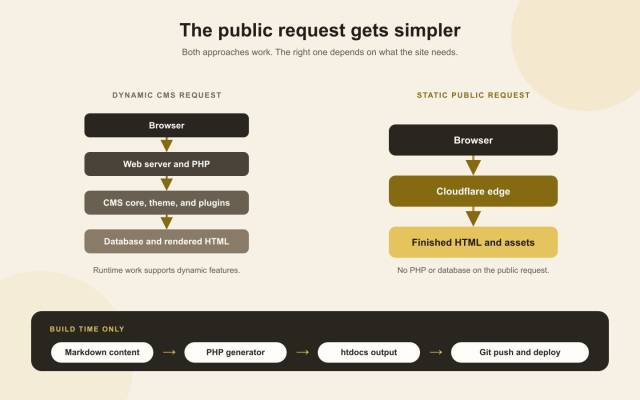
The dynamic path remains valuable when a site needs runtime features. For mikelopez.com, those features can happen at build time instead.
The distinction between build time and request time matters. PHP still has a role, but it runs when I build the site. A visitor does not wait for PHP, WordPress, a theme, plugins, or MySQL. The browser receives HTML, CSS, JavaScript, and images that already exist.
My hosting bill is $0, but the site is still hosted
I sometimes describe this setup as having no hosting, but that is not technically correct. Cloudflare Pages is the host. The more accurate statement is that I have no hosting bill for the current site.
Cloudflare documents that requests to static assets on Pages are free and unlimited. The Free plan still has operational limits, including build concurrency, monthly builds, number of files, and maximum file size. Its current Pages limits documentation lists 500 builds per month and 20,000 files per site on the Free plan.
Those limits are generous for a small personal publication, but they are still limits. If this site grows into something more dynamic, needs server-side functions at scale, or exceeds the plan, its cost model can change. Free today should never be translated into a promise that every future architecture will cost nothing.
For the site as it exists now, the recurring website expense is mainly the annual domain renewal. GitHub stores the repository, and Cloudflare Pages delivers the static files without a monthly Pages charge. I am not quoting a universal domain price because registrars, extensions, and renewals vary.
Cost was a benefit, but it was not the only reason for the move. I would rather have a simple system that happens to be inexpensive than a fragile system designed only to be free.
Static HTML reduced my maintenance surface
A normal WordPress installation has several layers that deserve attention:
- PHP and database versions
- WordPress core updates
- Theme updates
- Plugin updates and compatibility
- User accounts and login protection
- Backups for files and the database
- Runtime caching and server configuration
- Monitoring for failures that happen while pages are being generated
Those responsibilities are reasonable when the capabilities provide value. They become overhead when the public site is only serving documents.
The static version still needs maintenance. I maintain the generator, templates, build environment, domain, DNS, repository access, and deployment configuration. I verify links, browser behavior, accessibility, and performance. Static does not mean abandoned.
It does mean there are fewer runtime relationships to manage. There is no production database to migrate, no public WordPress login to protect, and no plugin update that can suddenly change a page on the next request. A deployed article is a set of files until I deliberately replace it with another set.
That smaller surface makes failures easier to reason about. If a deployment is wrong, I can inspect the generated output and the commit that produced it. If necessary, I can roll back to an earlier known-good deployment.
A smaller public attack surface is not the same as perfect security
Removing public PHP execution, a database connection, and a CMS login removes entire categories of application behavior from the production request path. There is less code available for an anonymous visitor to exercise.
That is a real security benefit, but I do not call any site unhackable. My GitHub account, Cloudflare account, DNS configuration, build machine, dependencies, and local credentials still matter. A compromised deployment account can publish malicious static files just as effectively as a compromised CMS account can change a database.
The advantage is focus. I can put attention on a smaller number of boundaries instead of maintaining a general-purpose web application for a read-only publication.
Performance became easier to make repeatable
Static HTML did not hand me perfect performance automatically. Large images, render-blocking CSS, unnecessary JavaScript, poor cache rules, and layout shifts can make any static site slow.
What static generation gave me was a short and deterministic delivery path. That made it easier to see what the browser was doing and fix the remaining constraints.
I documented the full process in how I got a 100 PageSpeed Insights score on mobile and desktop. The final result required responsive images, metadata stripping, deliberate resource priority, deferred below-the-fold requests, small page-specific CSS, Cloudflare response headers, and regression tests. It was not just the absence of WordPress.
The static foundation did remove variables. I was optimizing finished assets rather than compensating for runtime rendering with several layers of caches. Every build can verify the same rules before anything reaches production.
Git became the publishing record
Leaving the WordPress dashboard changed the editing experience. I now write Markdown, build locally, review the generated page, and commit the result.
That workflow suits me because I already live in code editors and terminals. It gives each article a visible history. Content, templates, images, tests, and performance rules travel together. A pull request can show exactly what will change before it is merged.
Scheduled publishing is also explicit. A future-dated Markdown file stays in the source tree, but the normal build excludes it from htdocs. A preview build can render it locally for review. When its publication date arrives, an automated job rebuilds the public output, runs the checks, commits the generated change, pushes it, and verifies the deployment.
This is more engineering-oriented than clicking Publish in an admin screen. For a solo developer, that is a feature. For a newsroom or a client who expects a visual editor, it could be the wrong trade-off.
AI helped, but it was not a dependency
I used an AI coding assistant during the transition because it could inspect a lot of context quickly. It helped me trace old paths, reason about the generator, identify repeated work, produce narrow implementation changes, create image concepts, and turn successful fixes into tests.
That assistance made the feedback loop faster. It did not make the architectural choice for me, and it did not get to declare the result correct.
The repository, generated files, browser, test suite, Lighthouse reports, and production responses remained the evidence. I reviewed the output and rejected anything that did not meet the requirements.
AI is especially useful for a custom static system because small tools often have fewer tutorials and plugins than a mainstream CMS. An assistant can help explore the code you actually have. But nothing about this stack requires AI. The generator is ordinary PHP. The content is ordinary Markdown. The output is ordinary HTML.
If the AI disappeared tomorrow, the site would still build and deploy.
What I gave up by leaving WordPress
Static architecture has a cost, even when the hosting bill is zero.
I gave up the convenience of editing through WordPress Admin. I cannot install a plugin and instantly add a dynamic feature. User accounts, personalized pages, database-backed search, comments, forms, memberships, and ecommerce would require separate services or new application code.
Every new capability deserves a fresh decision:
- Can it happen during the build?
- Can a small amount of browser-side code handle it accessibly?
- Should a specialized external service own it?
- Has the site become dynamic enough that a CMS or application is again the simpler choice?
I do not want to rebuild WordPress one feature at a time. If mikelopez.com eventually needs what WordPress already does well, returning to WordPress would be a valid engineering decision.
Who should consider moving from WordPress to a static site?
A WordPress to static site move is worth evaluating when most of these are true:
- The site is mostly public, read-only content
- One technical owner or a small Git-comfortable team publishes it
- Content changes only when someone intentionally deploys it
- Dynamic features are minimal or can be separated cleanly
- Stable URLs, low maintenance, and predictable delivery matter
- The team is willing to own a build process
Staying on WordPress is usually the better choice when editors need an approachable dashboard, multiple roles and approvals matter, content relationships are complex, visitors log in, or proven plugins already solve important business requirements.
The decision is not static versus WordPress in the abstract. It is which operating model produces the least complexity for the people who own the site.
Practical lessons from the migration
If I repeated the move, I would keep the same priorities:
- Inventory real requirements before choosing a generator. Do not mistake features you happen to have for features you still need.
- Preserve public URLs. A faster site is not an improvement if old links break.
- Choose one source of truth. My Markdown content is authoritative; generated HTML is deployable output.
- Treat images as part of the build. Generate responsive sizes, declare dimensions, optimize every file, and strip metadata.
- Separate preview from publication. Future content must be reviewable without leaking into the production build.
- Test the output, not just the generator. Inspect actual HTML, feeds, sitemaps, headers, and browser behavior.
- Measure the deployed site. A local result does not prove what a CDN serves publicly.
- Keep the exit available. Plain Markdown and HTML are easier to migrate again than content trapped in a custom opaque format.
These lessons matter more than the specific PHP script I wrote. A static generator should make publishing simpler, not turn a personal blog into a framework project.
Frequently Asked Questions
Why move a WordPress site to static HTML?
Static HTML can be a better fit when a site primarily serves public content and does not need runtime CMS features. It removes database and server-side rendering work from public requests and can simplify deployment, maintenance, and performance work.
Is Cloudflare Pages really free for a static website?
Cloudflare currently states that requests to static Pages assets are free and unlimited. The Free plan still has build, file, project, and asset-size limits, so review the current official documentation for your use case.
What recurring costs remain?
For mikelopez.com, the domain renewal is the primary recurring website cost. Costs can differ if a site uses paid repository features, third-party services, Pages Functions, Workers, storage, or exceeds free-plan limits.
Is a static site faster and safer than WordPress?
It can have a shorter request path and a smaller public attack surface, but neither outcome is automatic. Poor assets can make static pages slow, and deployment accounts still require strong security. A well-built WordPress site can also be fast and secure.
What functionality do you lose when leaving WordPress?
You lose the built-in editing dashboard and easy access to dynamic CMS and plugin features. Comments, memberships, ecommerce, user accounts, complex search, and visual editorial workflows require other solutions.
Do I need AI to build or maintain a static site?
No. AI can help with investigation, implementation, migration, and testing, but the underlying tools are standard PHP, Markdown, Git, HTML, CSS, and JavaScript. The system should remain understandable and operable without an AI assistant.
When is WordPress still the better choice?
WordPress remains a strong choice when nontechnical editors publish frequently, multiple users need roles and workflows, visitors need accounts, or mature plugins already provide the dynamic features the site depends on.
Audit the application your website has become
I did not leave WordPress because WordPress failed. I left because mikelopez.com had become a simple publication sitting on top of a general-purpose application.
The static version gives me the capabilities I use, a smaller system to maintain, a $0 Cloudflare Pages bill under the current plan, and an annual domain renewal as the main recurring cost. AI helped me get there, but the architecture does not depend on it.
Look at your own content-focused site and list what it truly needs today. If the database, login, runtime, and plugin stack are still earning their place, keep them. If they are not, a smaller tool may be the more responsible choice.